#What is PMax Channel Distribution?
PMax channel distribution is simply how your ads are shown across Google’s different networks. Unlike standard campaigns where you pick one channel (like Search or Display), PMax automatically spreads your ads across them all.
This is both powerful and sometimes frustrating - powerful because you get a broad reach, but frustrating because you don’t control it as tightly.
#Which Channels Do PMax Campaigns Distribute To?
PMax campaigns can show your ads on:
- Google Search: when people search for products or services like yours.
- Google Display Network: banner ads across websites that partner with Google.
- YouTube: before, during or after videos.
- Google Maps: handy for local businesses.
- Google Discover: personalised feeds in the Google app.
- Gmail: in the promotions and social tabs.
- Shopping ads: product-based placements in search results.
In other words, it’s Google’s way of giving you “all in one” coverage.
#How to See PMax Channels in Your Account
If you want to check which channels your PMax campaigns are using, follow these steps:
- Log into Google Ads and go to your PMax campaign.
- Navigate to Insights and reports → Channel performance
- From here, you can view how your ads were served across channels, networks and placements.
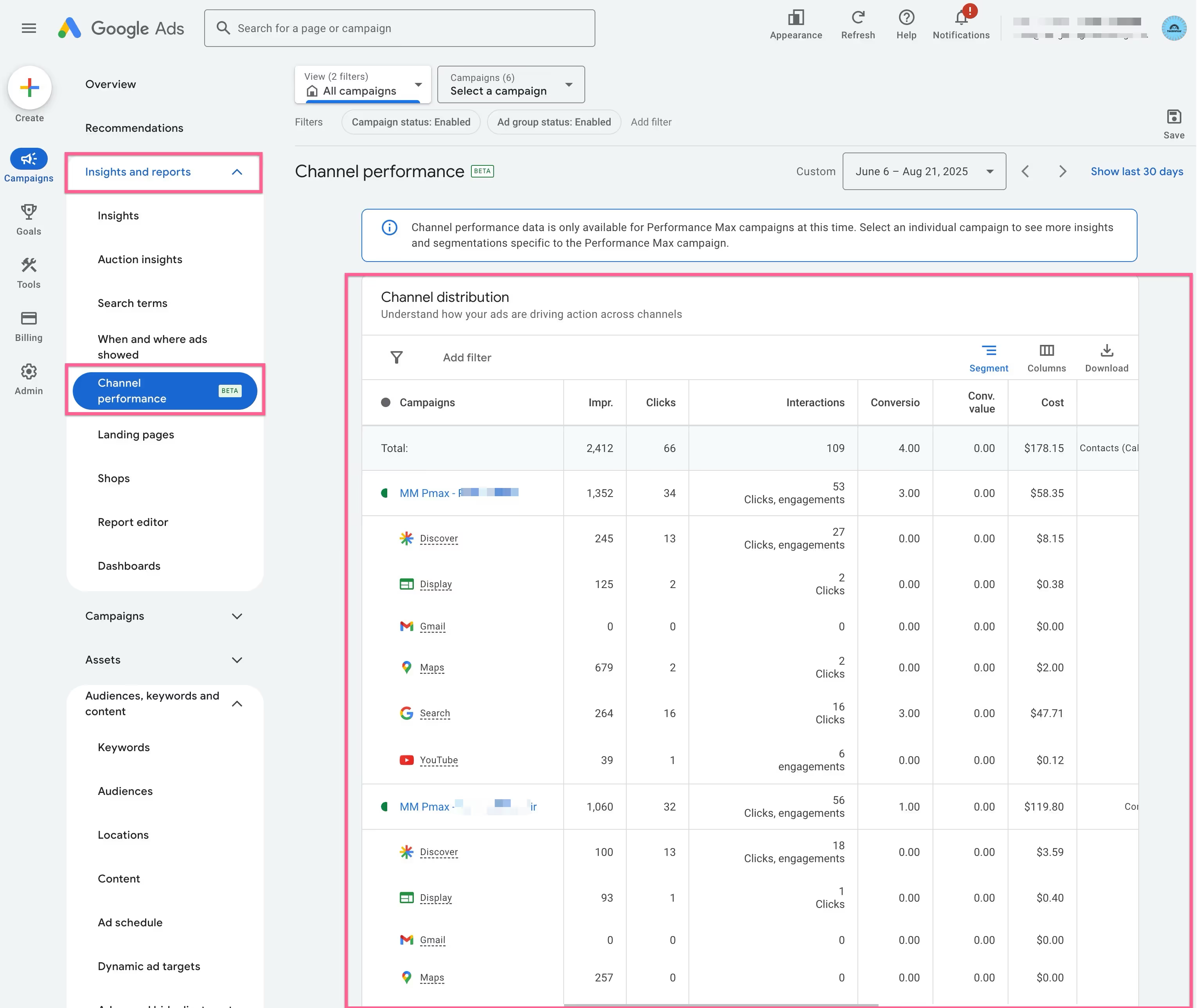
It won’t give you as much detail as a traditional campaign, but it does show you how impressions, clicks and conversions are split across the different Google networks.
#FAQs
Q: Can I choose which channels PMax runs on?
A: No. PMax automatically distributes your ads across all available channels.
Q: Can I exclude a channel if it’s not working?
A: Not directly. You can influence performance by adjusting assets and targeting, but you can’t turn off individual channels.
Q: Do I need video for PMax?
A: It helps! If you don’t upload one, Google may auto-generate videos from your assets. Best to provide your own.
Q: Is PMax better than running separate campaigns?
A: It depends. PMax is simpler and gives wide coverage, but if you want deep control over one channel (e.g. Search only), running separate campaigns may be better.
#Conclusion
Performance Max campaigns are a powerful tool for small businesses - but only if you understand how they work. By checking your PMax channel distribution, you can see where your ads are being shown and make smarter decisions about budget and creative.
Don’t just “set and forget” your campaigns. Take the time to review where your ads are running and adjust your strategy accordingly.
This guide is written by Hedgehog, a ‘Done With You’ digital marketing consultancy specialising in small and medium businesses in Australia. We offer digital marketing strategy, planning, training and implementation.
