#What’s New in Performance Max: Search Terms and Negative Keywords
Historically, Performance Max has operated as a black box - especially when it came to search terms. Advertisers had little to no visibility on what people were actually typing into Google before clicking their ads.
That’s changed.
You can now:
- See a list of search terms that triggered your PMax ads
- Filter by conversions to see what’s working
- Add negative keywords to block irrelevant queries
#Why This Update Matters
This is a huge win for advertisers - especially small businesses who need every dollar to count.
Previously, if your PMax campaign was serving ads for off-topic or irrelevant searches, you had no easy way to stop it. Now, you can review search terms just like in a regular Search campaign and exclude what’s not working.
This update gives you:
- Better campaign control
- Potential for improved ROI by not wasting clicks on irrelevant searches
- A clearer understanding of how your ads are performing
#How to See Search Terms in PMax
To view search terms in your Performance Max campaign:
- Go to your PMax campaign in Google Ads
- Click on the “Insights and reports” tab
- Select the “Search terms” section
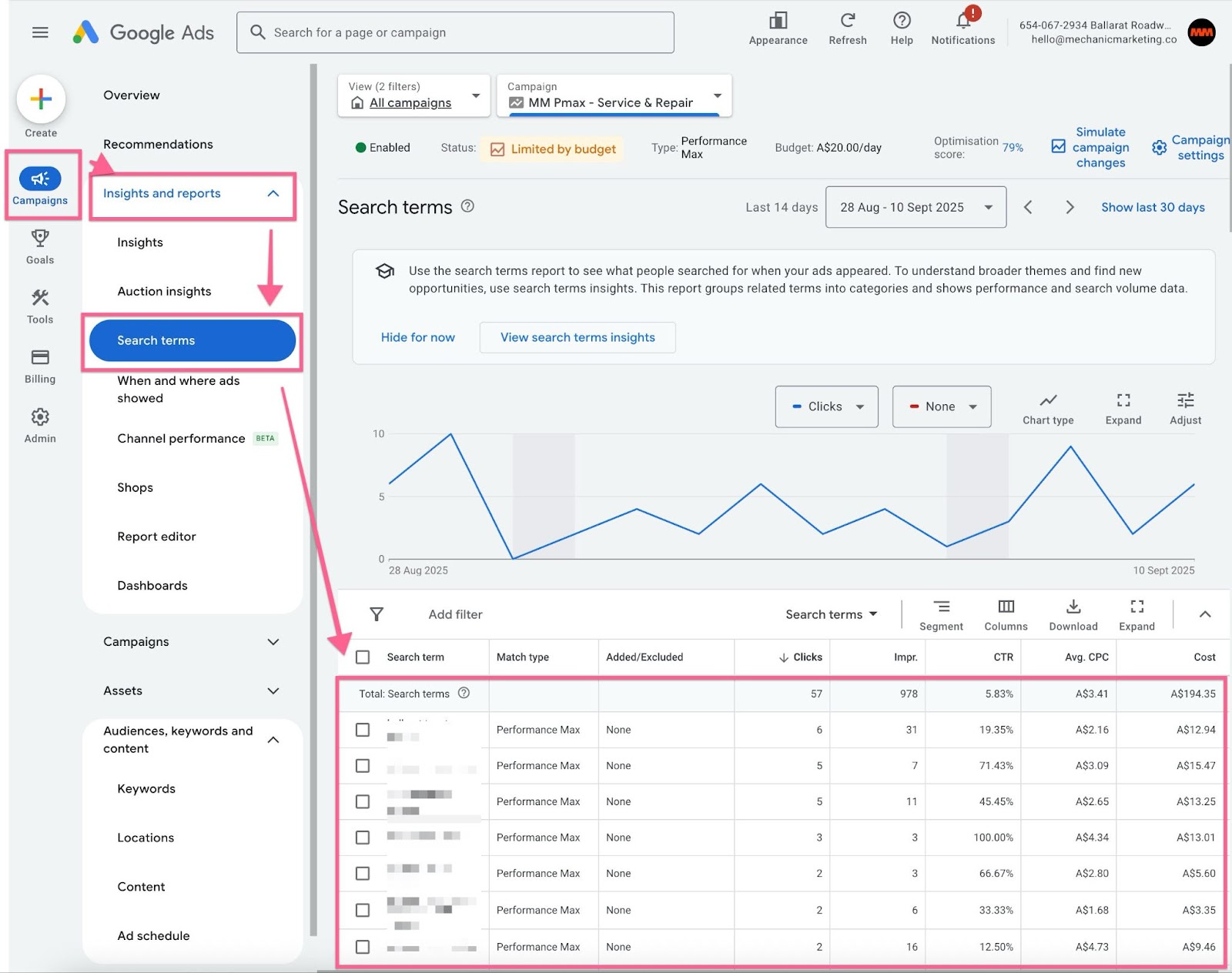
Important note: You’ll only see aggregated data, not every individual search term. Google still applies thresholds before showing search terms (similar to Search campaigns).
#How to Add Negative Keywords to Performance Max
#Campaign-Level Negatives
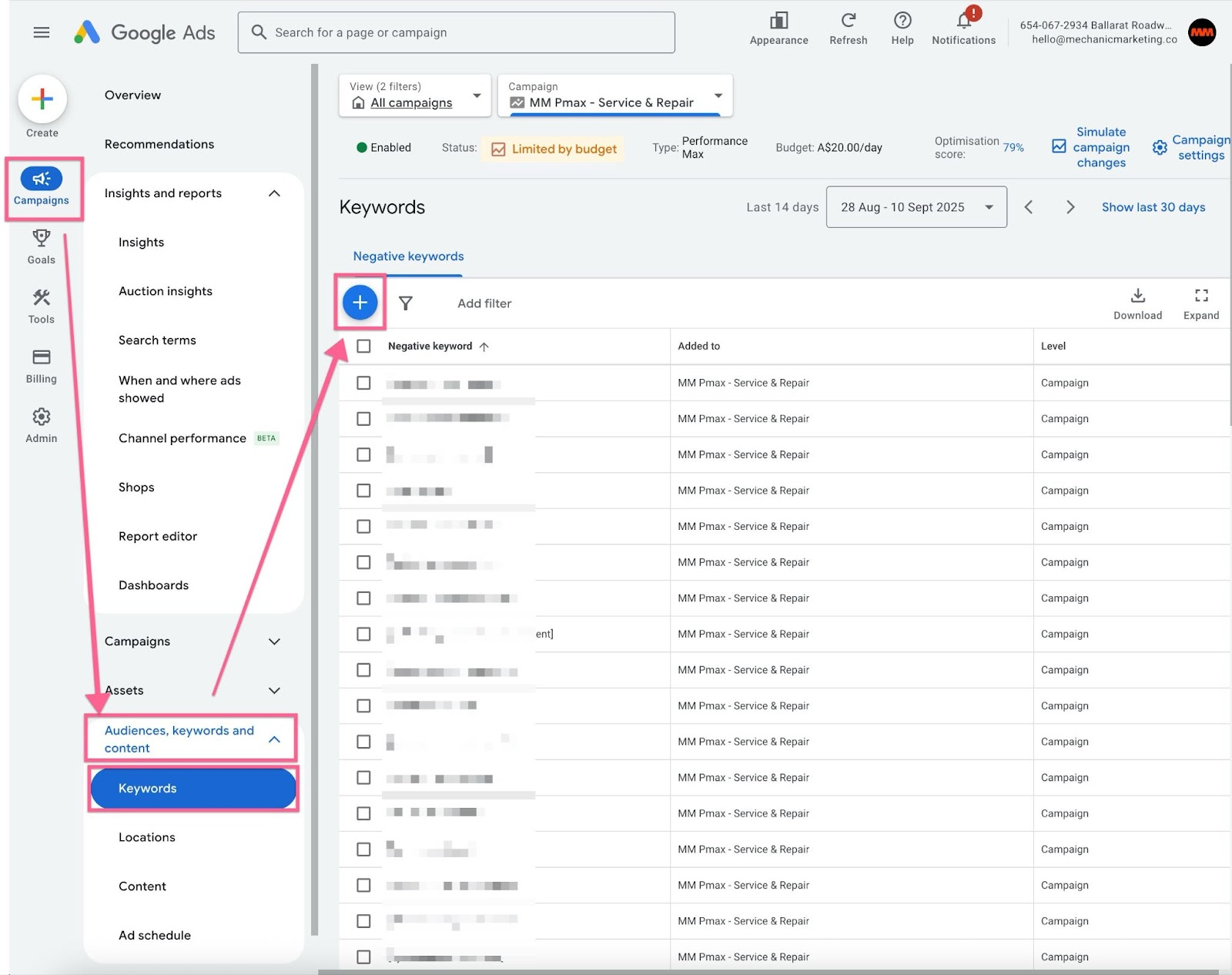
- Go to your PMax campaign
- Select “Settings”
- Scroll to “Negative Keywords”
- Add the terms you want to exclude
#Tips to Make the Most of Your PMax Search Insights
- Use filters: Focus on terms with clicks but no conversions
- Exclude themes, not just exact terms: Block whole categories of irrelevant traffic
- Check weekly: Search behaviour changes often, especially with broad targeting
- Add branded terms as negatives (if you don’t want to pay for your own name)
- Use account-level lists to reduce repetitive work across campaigns
#Common Mistakes to Avoid with PMax Keyword Management
- Waiting too long to check search terms. You could be wasting budget
- Overblocking: removing too many terms can restrict your reach
- Adding negatives without reviewing impact: monitor performance closely after changes
- Forgetting about match types: all negatives are added as exact or phrase match only
#When PMax Still Isn’t Right For You
Even with this update, PMax might not be the best fit if:
- You need full control over every search term
- You have tight budgets and want to optimise every cent
- You’re in a highly specific niche where automation misses the mark
For these cases, sticking with a standard Search campaign might still give you better results.
#Conclusion
Performance Max is no longer a complete black box - and that’s a big win.
With access to search term insights and negative keyword controls, small businesses finally have the tools they need to make smarter, more profitable decisions in Google Ads.
Don’t forget to regularly check your search terms and refine your negative keyword list. It’s a small tweak that can make a big impact.
This guide is written by Hedgehog, a ‘Done With You’ digital marketing consultancy specialising in small and medium businesses in Australia. We offer digital marketing strategy, planning, training and implementation.
