If you’re still running legacy Search campaign settings, Google is going to change them for you starting in September 2026. Not a prompt. Not an invitation. An automatic upgrade to AI Max, applied to eligible campaigns that haven’t already moved across.
This isn’t a reason to panic, and AI Max isn’t a downgrade. But there’s a meaningful difference between a change you chose and a change that happened to you while you were busy running your business. This post covers what’s actually changing, what Google preserves, and the five things worth checking in your Google Ads account before September rather than after.
#Key summary
- Eligible Search campaigns with legacy settings automatically upgrade to AI Max from September 2026
- Campaigns using automatically created assets and broad match are in scope for the September auto-upgrade
- Dynamic Search Ads got a longer runway, with the DSA sunset extended out to February 2027
- Google mirrors your existing settings on upgrade to keep performance stable, and preserves legacy URL controls
- You keep real controls, including brand restrictions, location restrictions and text guidelines
- One-click experiments let you test the change against your current setup instead of guessing
#What AI Max actually is
AI Max is Google’s replacement for the older automated Search behaviours, and the honest way to describe it is that it widens the net.
Legacy Dynamic Search Ads worked off your website content. Google crawled your pages, matched searches to them, and generated ads pointed at whichever page fit. AI Max uses broader intent signals than page content alone. It matches queries beyond what traditional broad match would reach, generates ad variations, and leans harder on Google’s understanding of what a searcher wants.
For a lot of accounts that’s an improvement. Page-content matching was always a blunt instrument, especially for businesses whose site copy doesn’t use the words their customers do. A mechanic whose site says “vehicle diagnostics” while customers search “why is my engine light on” was poorly served by the old system.
The risk sits in the same place as the benefit. Broader matching means your spend can reach queries you never chose, on landing pages you didn’t nominate. That’s fine when the widening is smart and expensive when it isn’t.
#What’s changing and when
Right now you’re in the voluntary phase. Google provides upgrade tools that migrate your settings and historical data across, and you can move whenever you’re ready.
From September 2026, remaining eligible Search campaigns with legacy settings upgrade automatically. Campaigns using automatically created assets and broad match settings are squarely in scope.
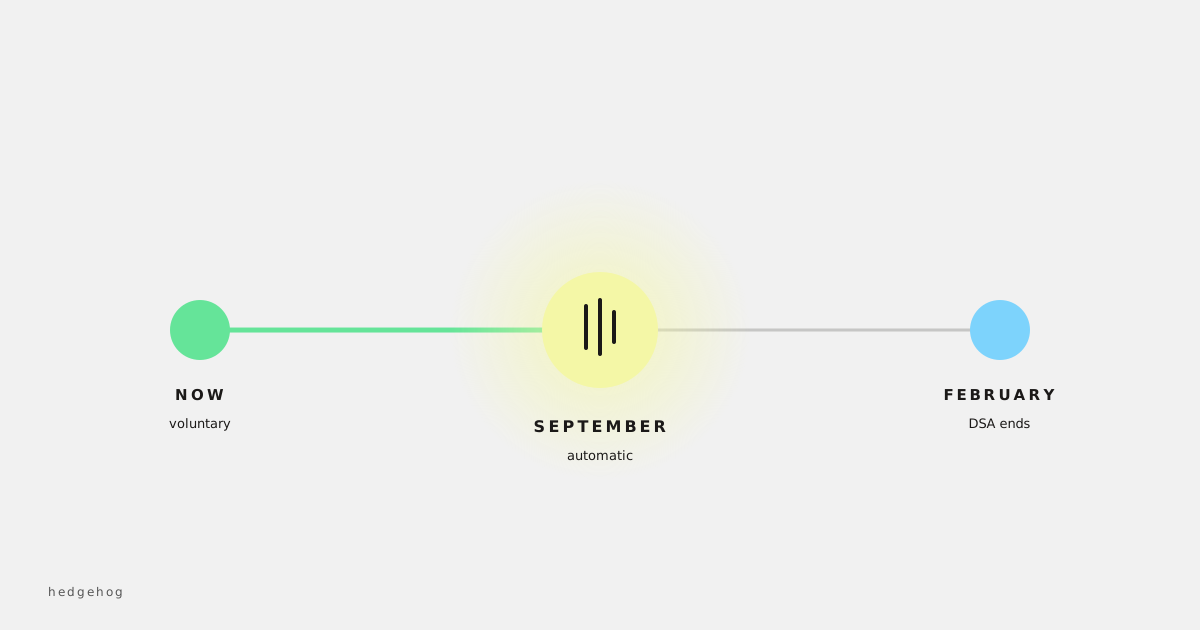
Dynamic Search Ads specifically got an extension. Google pushed the DSA sunset out to February 2027, having originally signalled something sooner. So if you’re running true DSA campaigns you have more runway than the September date suggests. Use the time to test properly.
Google states it mirrors legacy settings on auto-upgrade to maintain performance stability. That’s reassuring and it’s also the sentence to read carefully. Mirroring your settings isn’t the same as mirroring your results, because the matching behaviour underneath those settings is what changed.
#Five things to check before September
Your negative keyword lists. These now do considerably more work than they used to. Under broader matching, your negatives are the main thing standing between your budget and queries you don’t want. Most accounts we look at have a negative list that was built once, three years ago, and never revisited. Go through it. Add the obvious job-seeker, DIY and competitor-research terms for your industry.
Brand controls. AI Max includes brand restrictions, so you can constrain which brand terms a campaign can and can’t chase. If you sell other people’s brands, or you don’t want to pay for your own, set this deliberately rather than inheriting a default.
Which landing pages are in scope. Generated ad variations pull from your page content, so a thin, outdated or orphaned page becomes an ad you didn’t write. Crawl your own site. Anything you wouldn’t want a customer to land on from a paid click should be excluded, fixed, or removed.
Your conversion tracking, before anything else changes. You cannot judge the upgrade without a clean baseline. If your conversion setup is half-broken, and in small business accounts it very often is, fix that first. Otherwise you’ll be comparing a bad number to a different bad number in October and drawing confident conclusions from noise.
Budget guardrails. Broader matching finds more inventory. Check your daily caps and your bid strategy targets are set to numbers you’d actually be comfortable spending against a wider query set.
#Use the experiment instead of arguing about it
The single most useful thing in the AI Max rollout is the one-click experiment. It lets you run the upgraded setup against your existing one and compare, on your own account, with your own money and your own customers.
That matters because every confident opinion you’ll read about AI Max, including ours, is based on a different account than yours. Industry, margin, seasonality, geography and the quality of your site all move the answer. A workshop in regional NSW and a national ecommerce brand will get different results from the same feature.
Run the experiment for long enough to clear your normal sales cycle, not for a week. Then look at leads and revenue rather than clicks and impressions. AI Max will almost always win on volume metrics. Volume was never the question.
#What good and bad look like afterwards
In the first fortnight, watch your search terms report more closely than usual. You’re looking for whether the widening is finding adjacent, sensible queries or wandering off. Adjacent and sensible looks like new phrasings of things you already sell. Wandering looks like informational searches, other industries, or people clearly looking for a job.
Watch cost per conversion rather than conversion volume, and watch lead quality if you’re a service business. The classic failure pattern isn’t a collapse in performance. It’s more leads at a similar cost that convert to sales at a lower rate, which looks fine in Google Ads and terrible in your bank account.
If it’s going badly, tighten before you retreat. Negatives, brand exclusions, location restrictions and landing page scope will fix most of it.
#When AI Max isn’t right for you
It’s worth saying plainly, because most coverage won’t. Broader automated matching suits businesses with wide, varied demand and reasonable volume. It suits ecommerce with deep catalogues. It suits services where customers describe their problem in a hundred different ways.
It suits you less if you sell something highly specific to a small, well-defined audience, where you already know the twenty queries that matter and you’ve spent years refining them. In that situation the widening has nowhere useful to go, and you’re paying for Google to rediscover what you already knew.
It also suits you less if your website is thin or out of date, because generated variations are only as good as what they’re drawing from.
#Frequently asked questions
#Can I stop the automatic upgrade?
The September auto-upgrade applies to eligible Search campaigns with legacy settings. Rather than looking for a way to avoid it, the better approach is to upgrade deliberately on your own timeline, having run an experiment first, so you control the change instead of receiving it.
#What happens to my Dynamic Search Ads?
DSA has a longer timeline, with the sunset extended to February 2027. Campaigns using automatically created assets and broad match still fall under the September 2026 auto-upgrade. Check which of those two descriptions matches what you’re actually running, because plenty of accounts have both.
#Will my performance drop?
Google mirrors legacy settings on upgrade to keep things stable, so a cliff is unlikely. Drift is more common than collapse. The accounts that struggle are usually the ones with weak negatives, thin landing pages or broken conversion tracking, where the upgrade exposes a problem that was already there.
#Do I lose control of my campaigns?
No. You keep brand and location restrictions, text guidelines for ad customisation, and legacy URL controls carry through the migration. It’s less control than manual keyword management and considerably more than Performance Max.
#Should I just move to Performance Max instead?
Different tool, different job. AI Max sits inside Search. Performance Max spans channels and gives you less visibility. If Search is working for you, upgrading Search is the smaller, more sensible step.
#Do this before September
Pick an afternoon in the next few weeks. Clean your negatives, check your conversion tracking is honest, exclude the landing pages you wouldn’t want a paid click hitting, and set your brand controls deliberately. Then launch a one-click experiment and let it run past your normal sales cycle.
That’s a couple of hours of work to turn a change happening to you into a change you’ve tested and chosen. September isn’t far away.
If you’d rather someone went through the account with you before the upgrade lands, Google Ads training is exactly the kind of thing worth having done once properly rather than figuring out under pressure.
This guide is written by Hedgehog, a DIY digital marketing consultancy specialising in small and medium businesses in Australia. We offer digital marketing consulting, coaching and training.
